Category: Google Ads

  • 22 BEST SEO CHROME EXTENSIONS TO STREAMLINE AUDITS & PERFORMANCE WORKFLOWS

    22 BEST SEO CHROME EXTENSIONS TO STREAMLINE AUDITS & PERFORMANCE WORKFLOWS

    Most performance marketers and SEO specialists do not suffer from an absence of software tools – they suffer from an unmanageable tab footprint.

    Jumping between eight disconnected web apps just to audit a single landing page drains hours of operational bandwidth.

    Tabs multiply, browser performance slows, and routine diagnostics drag on.

    Consolidating your workflow into a dedicated browser stack converts Google Chrome into a real-time audit hub.
    best seo chrome extensions 1

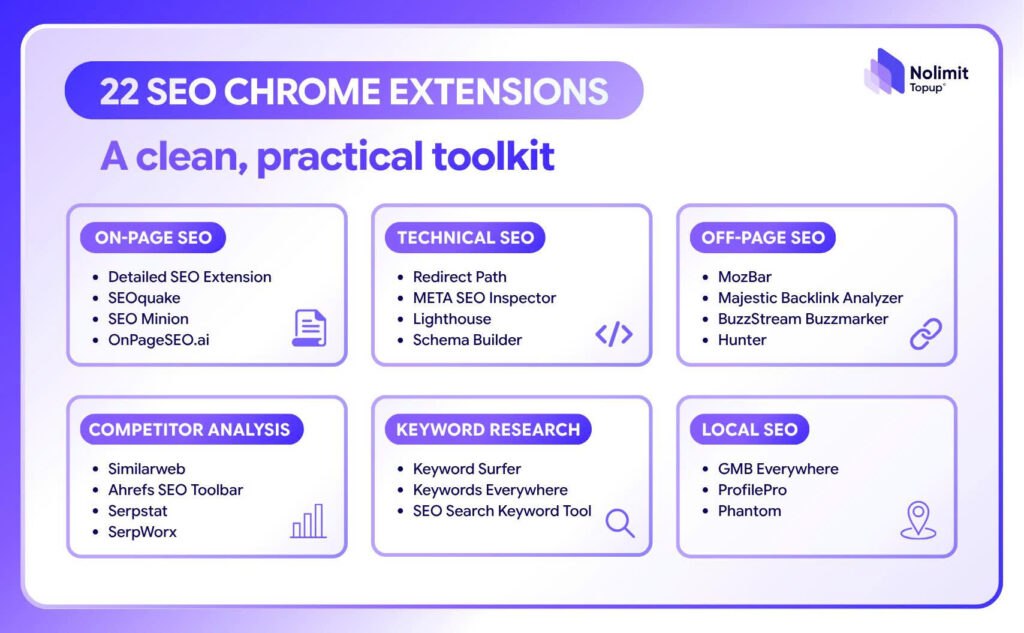
    Below is an operational breakdown of the 22 best SEO Chrome extensions, curated by Nolimit Topup and classified into 6 core search functions to keep your audits fast, repeatable, and accurate.

    THE 22 BEST SEO CHROME EXTENSIONS IN 2026

    1. On-Page SEO Extensions

    On-page diagnostics require immediate, one-click access to document architecture without viewing raw source code manually:

    • Detailed SEO Extension: Pulls a full on-page breakdown in a single click—title tags, meta descriptions, canonical URLs, robots directives, schema type validation, and heading tree structures ($H1-H6$).
    • SEOquake: Semrush-backed browser overlay providing instant page-level metrics, internal versus external link distributions, and real-time keyword density calculations.
    • SEO Minion: Streamlines daily on-page checks, verifies broken hyperlinks, previews SERP appearances, and audits hreflang configurations.
    • OnPageSEO.ai: Generates automated optimization recommendations and structural content insights directly on the target URL.

    2. Technical SEO Extensions

    Technical errors break search indexing and bleed crawl budget. These browser extensions surface delivery and schema errors immediately:

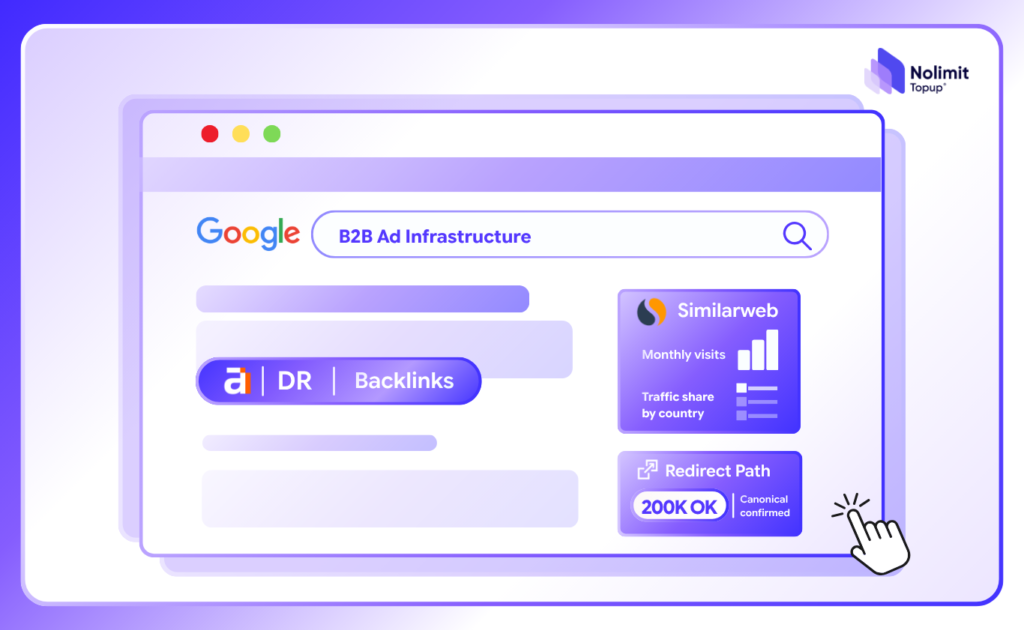
    • Redirect Path: Live HTTP status code inspector ($301$, $302$, $404$, $500$) that flags complex redirect chains, loops, and meta refresh delays before crawl equity leaks.
    • META SEO Inspector: Audits HTML meta tags, Open Graph properties, and structured microdata, highlighting missing tags in red.
    • Lighthouse: Built directly into the Chromium architecture to audit site speed, accessibility, progressive web apps, and Core Web Vitals (LCP, INP, CLS).
    • Schema Builder: Generates, edits, and validates JSON-LD structured data markups visually without writing code from scratch.

    3. Off-Page SEO & Outreach Extensions

    Backlink evaluation and partnership acquisition require fast qualification of prospect domains:

    • MozBar: Displays Moz Domain Authority (DA), Page Authority (PA), and link counts directly while browsing search results.
    • Majestic Backlink Analyzer: Delivers trust scores, citation flow metrics, and link distribution profiles for any active URL.
    • BuzzStream Buzzmarker: Streamlines link-building CRM outreach by logging prospect notes, contact details, and link opportunities directly into databases.
    • Hunter (Email Finder): Extracts verified professional email addresses and department structures associated with any website in seconds.
    best seo chrome extensions 2

    4. Competitor Analysis Extensions

    Deconstruct competitor traffic sources and ranking performance on the fly:

    • Similarweb: Surfaces competitor traffic volumes, engagement trends, bounce rates, and traffic source splits across organic, referral, and paid channels.
    • Ahrefs SEO Toolbar: On-page report combined with live SERP overlays displaying domain rating (DR), URL rating (UR), search volumes, and backlink metrics.
    • Serpstat: Inspects competitor keyword rankings and visibility profiles directly from the browser bar.
    • SerpWorx: Injects side-by-side competitive SEO metrics directly underneath live Google SERP listings.

    5. Keyword Research Extensions

    Capture real search demand, CPC thresholds, and keyword ideas without switching out of the active search session:

    • Keyword Surfer: Injects local search volume, CPC rates, competitor word counts, and keyword suggestions directly inside Google search results at zero cost.
    • Keywords Everywhere: Displays historical search volume trends, related keyword suggestions, and “People Also Search For” data across Google, YouTube, and Amazon.
    • SEO Search Keyword Tool: Generates fresh keyword clusters and semantic ideas to build targeted content outlines.

    6. Local SEO Extensions

    Auditing multi-location brands and local visibility requires dedicated profile scrapers:

    • GMB Everywhere: Uncovers Google Business Profile (GBP) categories, review audits, and local ranking factors straight from Google Maps.
    • ProfilePro: Provides AI-driven optimization prompts to enhance Google Business Profile attributes and service listings.
    • Phantom: Runs detailed Google Business Profile audits to benchmark local search presence against nearby competitors.

    THE RULE OF 6: WHY INSTALLING ALL 22 EXTENSIONS SLOWS YOU DOWN

    Installing all 22 extensions simultaneously undermines your operational efficiency.

    Excessive browser plugins consume memory, slow render speeds, and create data clutter.

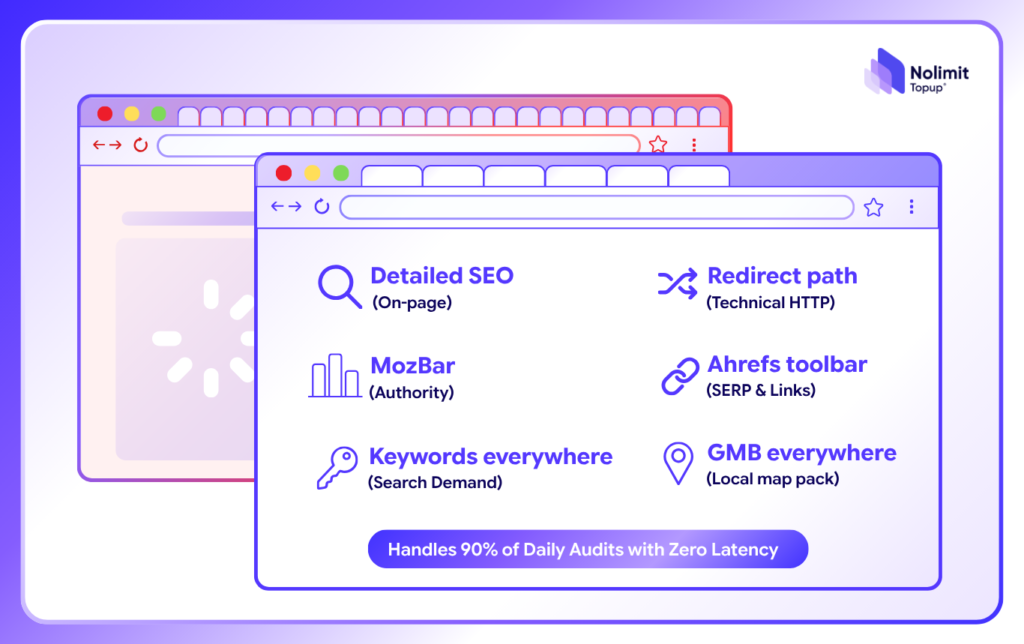
    A lean core stack covers 90% of daily SEO diagnostics:

    1. Detailed SEO (On-page meta & schema check)
    2. Redirect Path (HTTP status code & chain tracking)
    3. MozBar (Immediate domain authority context)
    4. Ahrefs SEO Toolbar (Live SERP metrics & backlink verification)
    5. Keywords Everywhere (Search volume & CPC validation)
    6. GMB Everywhere (Local pack & category analysis)
    best seo chrome extensions 3

    Reserve the remaining 16 extensions for specialized tasks.

    Pick the two tools that solve your immediate workflow bottleneck, run them consistently for two weeks, and expand only when necessary.

    A focused stack executed consistently outperforms an overloaded browser.

    PAIR ORGANIC CAPTURE WITH RESILIENT ADS INFRASTRUCTURE

    Building organic search visibility using the best SEO Chrome extensions helps you capture high-intent inbound demand.

    However, enterprise brands scaling globally do not rely on organic rankings alone.

    Profitable growth combines search capture with multi-platform paid media across Meta, TikTok, and Google.

    As daily advertising budgets increase, fragile personal ad accounts often trigger verification holds, daily spend caps, and unexpected delivery pauses.

    Nolimit Topup provides resilient, enterprise-tier ad infrastructure for global performance teams:

    • High-Trust Multi-Platform Agency Accounts: Whitelisted accounts across Meta, TikTok, and Google with established credit stability and zero arbitrary daily spending caps.
    • 1:1 Standby Contingency Architecture: Pre-configured reserve accounts ready to deploy instantly if primary ad assets face algorithmic disruption, keeping delivery uninterrupted 24/7.
    • Dedicated 1-on-1 Technical Diagnostics: Technical specialists providing tracking verification, pixel checks, and reliable balance funding across international payment gateways.

    BUILD A RESILIENT GROWTH ENGINE

    Capturing search demand requires disciplined diagnostics; scaling commercial revenue requires uninterrupted operational infrastructure.

    Streamline your browser tools to optimize your on-page assets, and back your paid campaigns with enterprise-grade agency accounts to scale without downtime.

    🚀 Ready to scale paid search and social campaigns without hitting spend limits or account restrictions?

    Stop letting infrastructure bottlenecks limit your growth. Contact the engineering team at Nolimit Topup to deploy high-trust enterprise agency ad accounts today.
  • GOOGLE ADS QUALITY SOCRE – 10 STEPS TO IMPROVE & LOWER CPC

    GOOGLE ADS QUALITY SOCRE – 10 STEPS TO IMPROVE & LOWER CPC

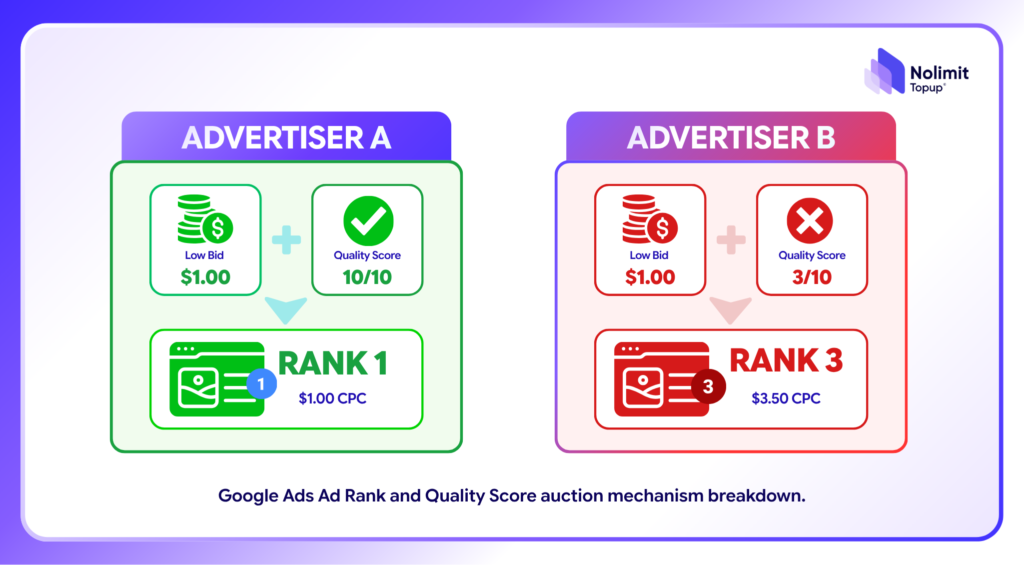
    In Google Search advertising, winning top ad placements does not strictly require placing the highest bids. Google’s ad auction evaluates the Ad Rank formula:

    Ad Rank = Max CPC Bid x Quality Score + Asset Impact

    google ads quality score 1

    A high Google Ads Quality Score (8/10 to 10/10) grants up to a 50% discount on cost-per-click (CPC), while a low Quality Score (below 5/10) inflates acquisition costs significantly.

    DECONSSTRUCTING THE 3 CORE PILLARS OF GOOGLE ADS QUALITY SCORE

    Google determines Quality Score on a 1-10 scale based on three fundamental diagnostic components:

    • Expected Click-Through Rate (eCTR): Google’s predictive measure of how likely a user is to click your ad when shown for a specific search query.
    • Ad Relevance: How closely your ad copy and creative assets match the exact search intent of the targeted query.
    • Landing Page Experience: How relevant, transparent, and seamlessly navigable the destination page is once a user clicks through.

    THE 10-STEP TECHNICAL CHECKLIST TO IMPROVE QUALITY SCORE

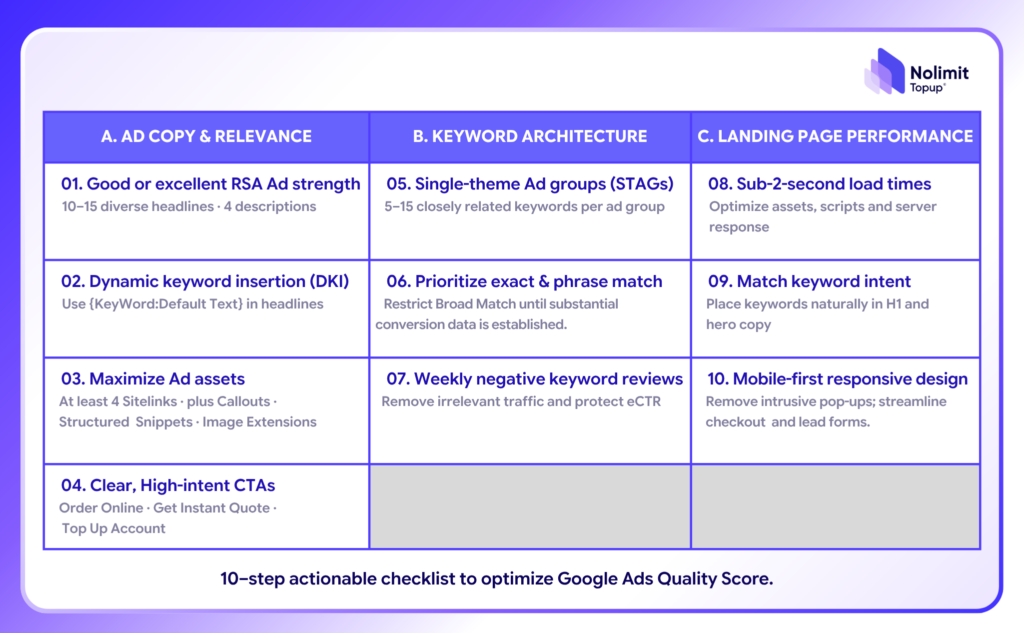
    A. Ad Copy & Relevance Optimization

    • Maintain RSA Ad Strength at ‘Good’ or ‘Excellent’: Provide 10-15 diverse headlines and 4 descriptions for Responsive Search Ads (RSA).
    • Implement Dynamic Keyword Insertion (DKI): Use {KeyWord:Default Text} in headlines to mirror exact search terms.
    • Maximize Ad Assets (Extensions): Deploy at least 4 Sitelinks, Callouts, Structured Snippets, and Image Extensions.
    • Include Clear, High-Intent CTAs: Drive action with specific phrasing (“Order Online”, “Get Instant Quote”, “Top Up Account”).
    google ads quality score 2

    B. Keyword Architecture & Structure 

    • Implement Single-Theme Ad Groups (STAGs): Keep ad groups tightly focused on 5–15 closely related keywords instead of dumping broad terms together.
    • Prioritize Exact & Phrase Match Keywords: Restrict Broad Match usage until substantial conversion data is established.
    • Aggressive Negative Keyword Management: Add negative keywords weekly to eliminate irrelevant impressions and protect eCTR.

    C. Landing Page Performance

    • Maintain Sub-2-Second Load Times: Optimize web assets, scripts, and server response speeds to prevent bounce rates.
    • Mirror Keyword Intent on H1 & Body Copy: Ensure target keywords appear naturally in the primary H1 header and hero section.
    • Ensure Mobile-First Responsive Design: Eliminate intrusive pop-ups and streamline checkout/lead forms for mobile users.

    SCALE HIGH-BUDGET GOOGLE ADS CAMPAIGNS WITH NOLIMIT TOPUP INFRASTRUCTURE

    Optimizing Quality Score on personal or unverified ad accounts is not enough when scaling aggressive international campaigns.

    Frequent balance holds, billing verification errors, and spend thresholds create severe roadblocks.

    google ads quality score 3

    Nolimit Topup provides robust multi-platform agency infrastructure designed for performance marketers and enterprise teams:

    • High-Tier Google Ads Agency Accounts: Whitelisted partner accounts with pre-warmed Trust, ensuring fast ad approvals and frictionless high-budget spending without daily cap restrictions.
    • 1:1 Instant Contingency Backup: Continuous backup infrastructure to migrate active campaigns immediately if unforeseen platform fluctuations happen.
    • Transparent Top-up & 24/7 Technical Support: Rapid balance funding with multiple international payment options and dedicated 1-on-1 technical diagnostics.

    MASTER QUALITY SCORE TO MAXIMIZE YOUR GOOGLE ADS ROI

    Achieving a high Google Ads Quality Score is the fastest route to outranking competitors while driving down customer acquisition costs.

    Combine precise campaign structure with an enterprise-grade account infrastructure to scale your ad operations globally with complete confidence.

    🚀 Ready to scale your Google Ads campaigns with unlimited agency accounts and zero disruption?

    Contact Nolimit Topup today – Get access to premium Google Ads Accounts!

  • SCALING GOOGLE ADS FOR MULTI-CATEGORY E-COMMERCE – INCREASING BUDGET WITHOUT SACRIFICING PROFITS

    SCALING GOOGLE ADS FOR MULTI-CATEGORY E-COMMERCE – INCREASING BUDGET WITHOUT SACRIFICING PROFITS

    Expanding Google Ads budgets is the goal of most E-commerce businesses as revenue starts to grow.

    However, in many cases, budgets double while profits fail to increase accordingly, or ROAS even drops after a few weeks.

    So what is the cause, and how can you scale Google Ads effectively when operating across multiple product categories?

    WHY DOES SCALING GOOGLE ADS NOT SIMPLY MEAN INCREASING BUDGETS?

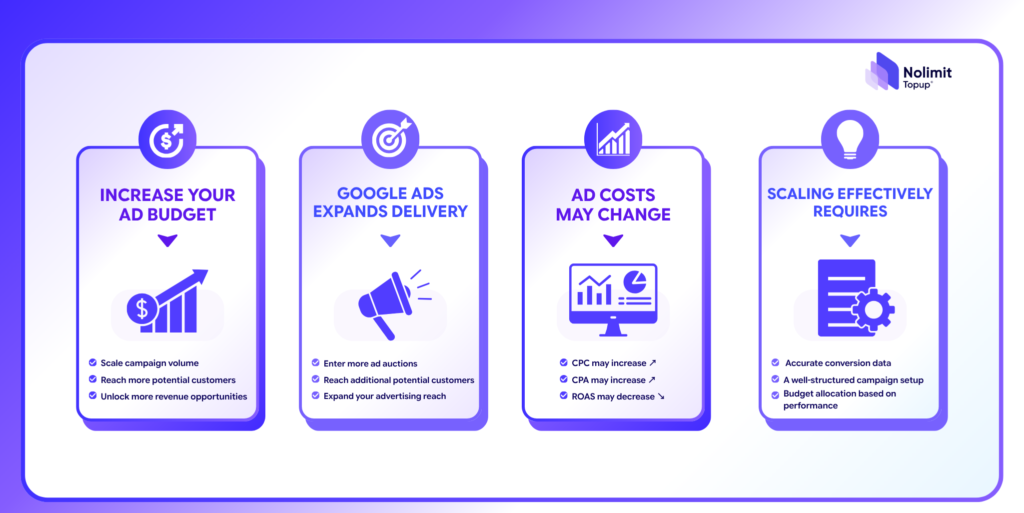
    When budgets expand, Google Ads distributes ads to more auction rounds and reaches new customer segments. This means advertising costs can rise if data and campaign structures are not optimized enough.

    google ads 1

    Some signs indicating a business is scaling incorrectly include:

    • ROAS drops immediately after increasing budget.
    • Cost per conversion rises continuously.
    • Budgets are poured into low-margin product groups.
    • Revenue increases, but profit margins do not improve.

    KEY FACTORS DETERMINING GOOGLE ADS SCALABILITY

    Before expanding budgets, businesses should comprehensively evaluate business efficiency rather than focusing solely on order counts.

    Priority factors to evaluate include:

    • ✅ Accurate conversion data.
    • ✅ ROAS higher than the break-even point.
    • ✅ Sufficient inventory to meet demand.
    • ✅ Stable website operations and order processing workflows.
    • ✅ Distinct profit targets for each category.

    For multi-category E-commerce, you should not apply a single blanket ROAS target across your entire product catalog.

    HOW DOES CAMPAIGN STRUCTURE IMPACT SCALING?

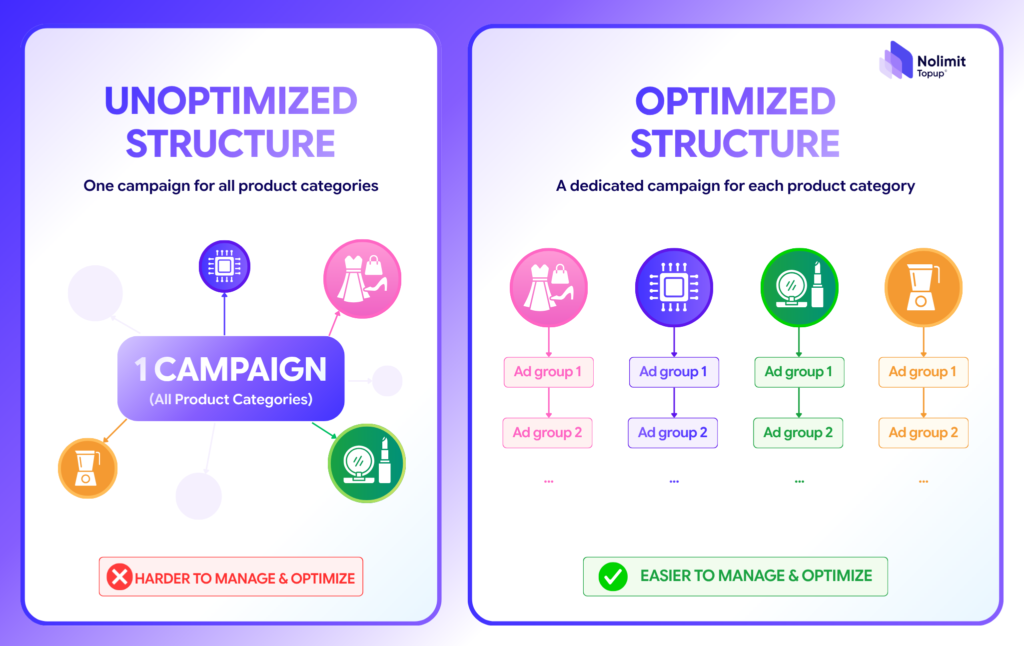
    A common mistake is grouping all products into a single Google Ads campaign.

    This makes it difficult for the system to allocate budgets reasonably and complicates evaluating performance for each individual category.

    Instead, campaigns should be segmented by:

    • Product groups.
    • Profit margins.
    • Average order value (AOV).
    • Seasonality.
    • Business objectives.
    google ads 2

    A clear structure makes expanding budgets much easier to control.

    AS SCALE GROWS, GOOGLE ADS INFRASTRUCTURE MUST ALSO EXPAND

    When a business deploys multiple brands or enters multiple markets simultaneously, managing Google Ads accounts becomes far more complex.

    At this point, many businesses choose to utilize Google Ads agency accounts or rent Google Ads accounts to:

    • Segregate budgets clearly.
    • Manage individual campaign groups separately.
    • Proactively launch new projects.
    • Minimize impact when a single account encounters issues.

    Using the right infrastructure ensures a more stable expansion process, especially for multi-category enterprises.

    NOLIMIT TOPUP – PARTNERING WITH ENTERPRISES IN SCALING GOOGLE ADS

    Scaling Google Ads is not just about increasing spend; it is a calculation involving data, campaign structure, and ad infrastructure.

    Nolimit Topup supports businesses in building suitable advertising systems for every growth stage – from account management and Google Ads infrastructure supplementation to operational process optimization.

    As a result, businesses can expand campaigns more effectively while maintaining firm control over budgets and profit margins.

    CONCLUSION

    Successful Google Ads scaling is not measured by the amount of money spent, but by the ability to grow revenue alongside sustainable profits.

    If your business is preparing to expand multi-category E-commerce advertising, ensure that your data, campaign structures, and account infrastructure are fully prepared before scaling budgets.

  • HOW TO FIX THROTTLED AD ACCOUNTS WITH MULTI-CHANNEL TECHNICAL STANDARDS 2026

    HOW TO FIX THROTTLED AD ACCOUNTS WITH MULTI-CHANNEL TECHNICAL STANDARDS 2026

    There is a pain point that any Media Buyer, MMO team, or ad runner has experienced:

    Campaigns spend money steadily, CTR metrics look great, but leads vanish completely.

    This situation occurs continuously across Facebook, TikTok, and Google, causing your budget to evaporate in vain.

    This is a clear sign that you are experiencing “Shadowban” or having your traffic flow silently throttled by algorithms.

    If you don’t know how to fix throttled ad accounts correctly and keep pumping more money in or constantly changing target settings, you are simply throwing money out the window.

    In this article, Nolimit Topup will highlight the root causes and guide you step-by-step through resolving this issue completely!

    WHY ARE AD ACCOUNTS THROTTLED?

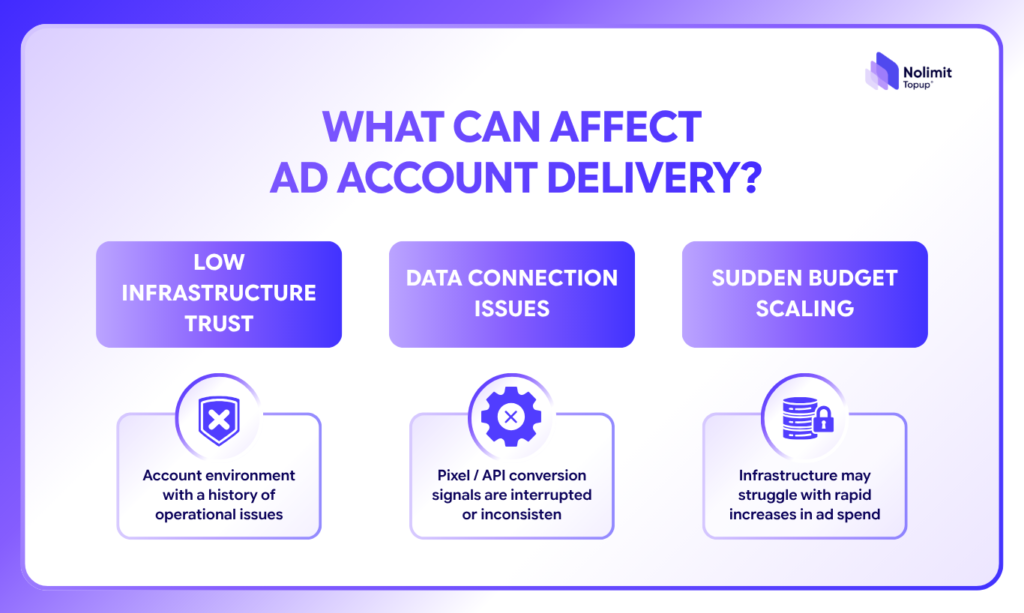
    To know how to fix throttled ad accounts, you first need to understand the core nature of why Meta, TikTok, or Google algorithms lower your delivery quality score.

    how to fix throttled ad accounts 1

    Basically, platform server systems categorize accounts based on Infrastructure Trust Score. The phenomenon of delivery throttling happens due to 3 core reasons as mentioned above.

    3 PRACTICAL STEPS TO FIX THROTTLED AD ACCOUNTS

    Below is the technical workflow to help you restore proper traffic flow for your campaign:

    STEP 1. Clean the operational environment & disconnect junk data sets

    The very first thing in fixing a throttled ad account is isolating your account from flagged environments:

    • Transfer accounts to run on clean environments, static IP ranges, or technical backup infrastructure with high trust scores.
    • Delete all custom audience data sets contaminated with spam or bot accounts.
    • Check and re-configure conversion Pixels/APIs to ensure feedback data to the system is uninterrupted.

    STEP 2. Check infrastructure quality score & load thresholds

    Don’t rush to increase your budget immediately. Re-check the load capacity of your system:

    • Lower campaign budgets to safe levels so algorithms release penalty warning thresholds.
    • Turn off campaigns with overlapping target audiences to avoid self-bidding competition that worsens account engagement throttling.

    STEP 3. Re-index machine learning with a “New Camp”

    After cleaning the environment, you need to send good signals so the algorithm re-learns your audience:

    • Create a new campaign with a small budget ($2 – $4/day), targeting directly at the niche audience with the highest conversion rate.
    • When genuine engagement (Inbox/Conversion) starts returning steadily, this indicates machine learning has exited the throttled state. Only then should you gradually scale up budgets using the 20%/increment rule.

    HOW DOES NOLIMIT AGENCY HELP YOU UNCLOG BOTTLENECKS & RECOVER TRAFFIC?

    Handling these steps manually can help salvage a campaign temporarily. However, if your core infrastructure remains weak, delivery throttling will recur as soon as you start scaling up budgets.

    how to fix throttled ad accounts 2

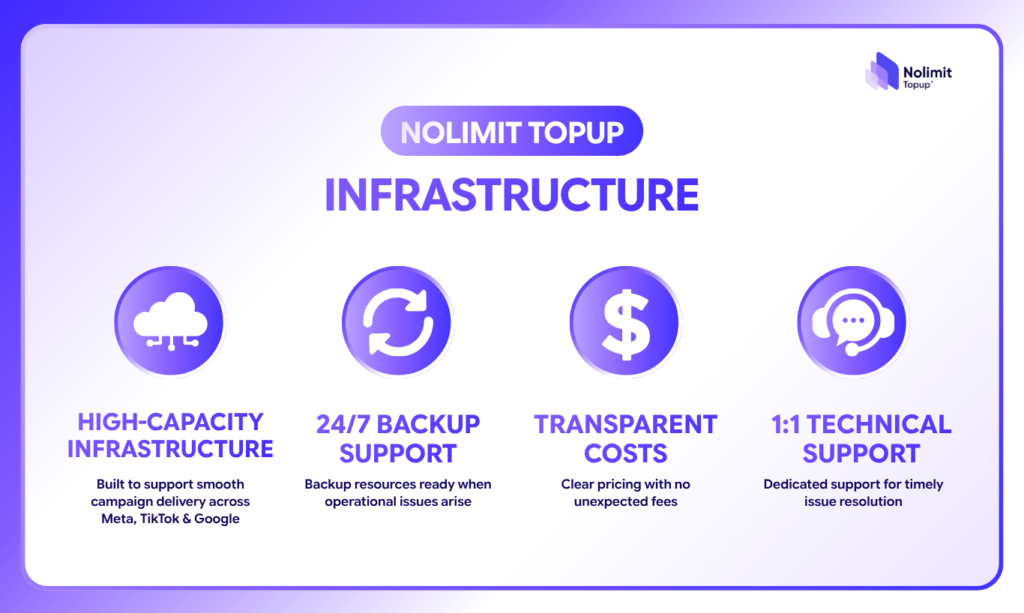
    That is why MMO teams, Media Buyers, and E-commerce businesses choose comprehensive infrastructure backing solutions at Nolimit Topup:

    • Multi-Platform Heavy Load Infrastructure: Nolimit Topup provides high-standard operating environments across Meta, TikTok, and Google. Algorithms confidently push deep traffic to genuine buying audience segments.
    • 24/7 Redundancy Mechanism: Alternative infrastructure solutions are always kept active. If platform fluctuations or broad sweeps occur, your campaigns maintain smooth, uninterrupted flows.
    • 1:1 Technical Backing Team: No more figuring out bug fixes on your own. Nolimit Topup operational support directly accompanies you to resolve bottlenecks immediately upon error alerts.

    DON’T LET THROTTLED AD ACCOUNTS INTERRUPT YOUR CASH FLOW

    Mastering how to fix throttled ad accounts will help you save campaigns in the short term.

    However, in high-budget operations, constantly having to “repair” a shaky launchpad only wastes your time, causes missed opportunities, and leaks revenue during peak seasons.

    Instead of passively waiting for algorithms to “release” distribution, it’s time to proactively build a solid operational infrastructure to scale campaigns sustainably and protect cash flow.

    Is your ad account spending money pointlessly, stuck with delivery errors and no orders?

    Don’t let your budget continue evaporating!

    Nolimit Topup’s technical team is ready to review, diagnose, and provide the most optimal infrastructure backup configuration for your campaigns.

  • MULTI-PLATFORM ADVERTISING IN CUSTOMER JOURNEY

    multi-platform advertising 0

    Customers rarely make a purchase after seeing an ad for the first time.

    They may discover a product on TikTok, learn more on Facebook, search for the brand on Google, and eventually visit the website to complete their purchase.

    This shows that the customer journey increasingly takes place across multiple platforms. Each channel plays a different role in building awareness, nurturing interest, and driving conversions.

    Let’s explore the key roles of each platform with Nolimit Topup!

    1. ADVERTISING IN THE MULTI-PLATFORM CUSTOMER JOURNEY

    Customers may interact with a brand across multiple touchpoints before making a purchase:

    • TikTok Ads: Create awareness and reach new audiences.
    • Meta Ads: Maintain engagement, build trust, and support remarketing.
    • Google Ads: Capture search intent and support conversions.
    • Website/E-commerce Platform: Complete the purchase.

    Not every customer follows the same journey. Businesses should identify which channels create awareness, which support consideration, and which drive conversions.

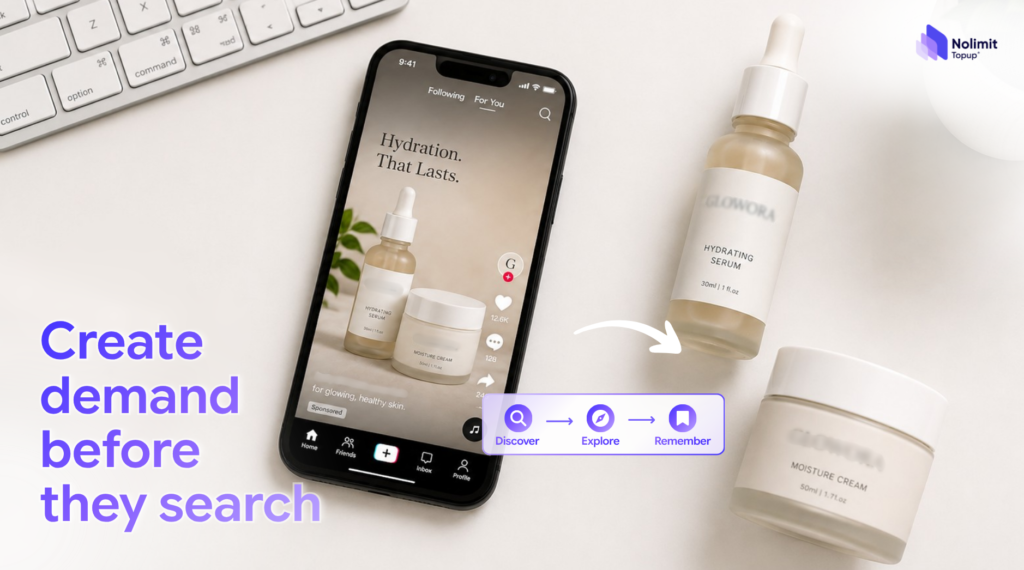
    2. TIKTOK ADS: CREATING DEMAND BEFORE SEARCH

    TikTok Ads are effective at the early stage of the customer journey, when users may not be actively searching for a product.

    Short-form videos help brands capture attention, reach new audiences, and test different content angles.

    multi-platform advertising 1

    Businesses can track video views, engagement, website visits, and brand searches alongside direct sales to better evaluate TikTok’s contribution.

    Creative is also important. Content should feel natural, get to the point quickly, and fit the way users consume short-form videos.

    3. META ADS: MAINTAINING CUSTOMER ENGAGEMENT

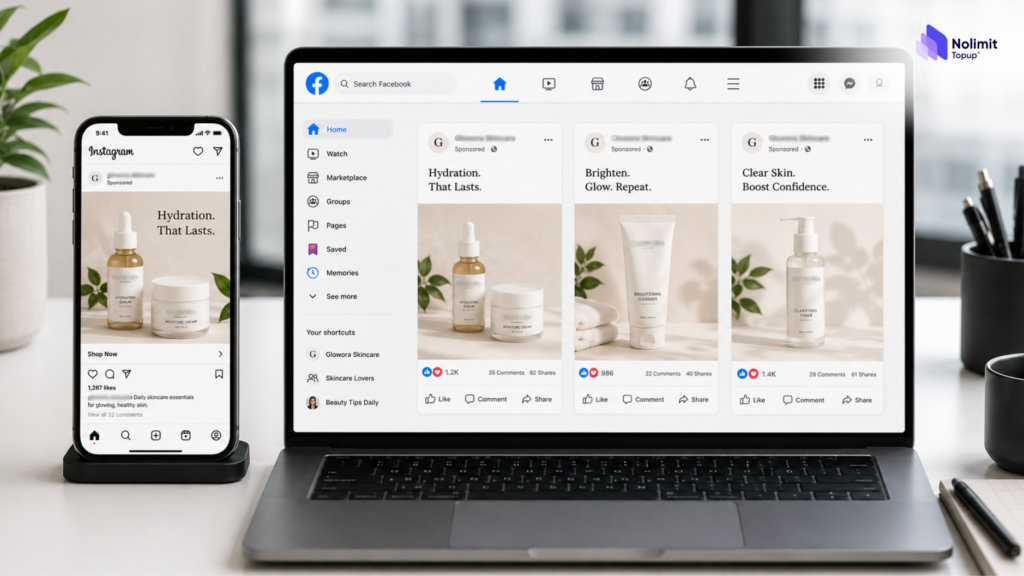
    Meta Ads, including Facebook and Instagram, are useful for staying connected with people who already know or have interacted with the brand.

    Businesses can use Meta Ads to:

    • Introduce products and key benefits.
    • Share reviews and real customer experiences.
    • Remarket to website visitors.
    • Reach people who watched videos or engaged with the brand.
    • Remind users about products they added to their cart.
    multi-platform advertising 2

    For remarketing, businesses should monitor Frequency and refresh creatives regularly to avoid repetitive ad exposure.

    4. GOOGLE ADS: DRIVING CONVERSIONS WITH SEARCH INTENT

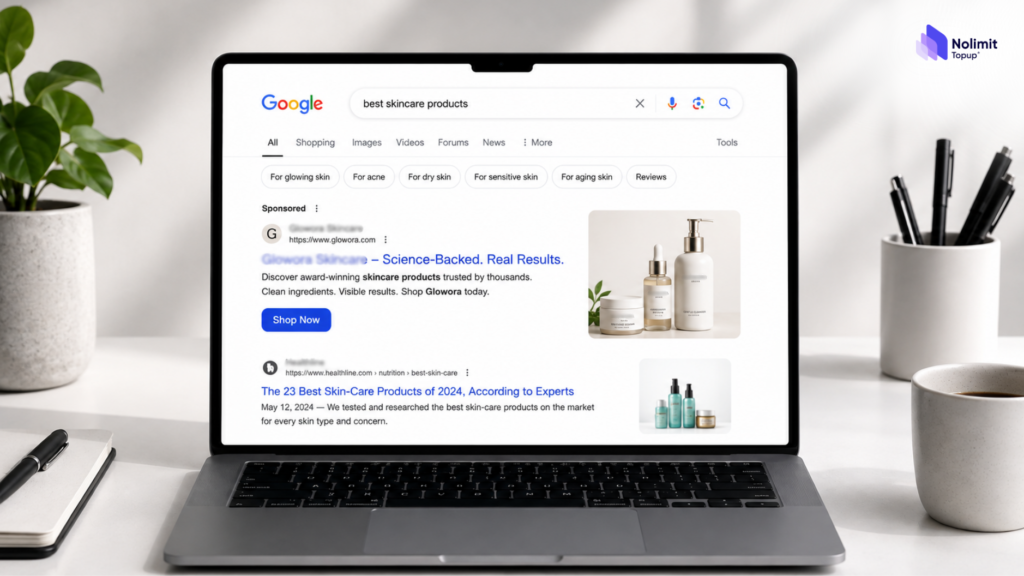
    Google Ads reaches users when they already have a need and are actively searching for information.

    Businesses can target branded keywords, product searches, purchase-intent queries, and comparison searches.

    However, a Google search may be triggered by earlier touchpoints on TikTok or Meta. Therefore, each channel should not be evaluated completely in isolation.

    multi-platform advertising 3

    5. ADVERTISING BUDGET ALLOCATION AND INFRASTRUCTURE

    Businesses do not need to split their budget equally across every platform. Budget allocation should reflect the objectives and role of each channel.

    When managing multiple platforms, businesses also need to monitor budgets, balances, account status, and user access effectively.

    If additional advertising infrastructure is needed, businesses can consider Nolimit Topup‘s rented ad accounts for Meta Ads, Google Ads, or TikTok Ads.

    However, ad accounts are only a supporting solution; performance still depends on strategy, budget allocation, and channel optimization.

    CONCLUSION

    Multi-platform advertising is not about running ads on as many channels as possible. It is about giving each platform the right role in the customer journey.

    TikTok Ads create awareness, Meta Ads maintain engagement, and Google Ads capture conversion intent.

    When these channels work together and budgets are allocated strategically, businesses can make better use of every customer touchpoint.